


MBTA Go — Official
3.755.00 Reviews
App Specs
- Version
- 2.1.4
- Updated On
- License
- Free
- Downloads
- 50,000+
- Developer
- MBTA
- Categories
- Maps & Navigation
- Platform
- Android
Screenshots
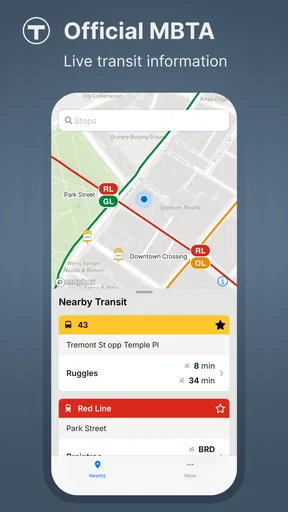
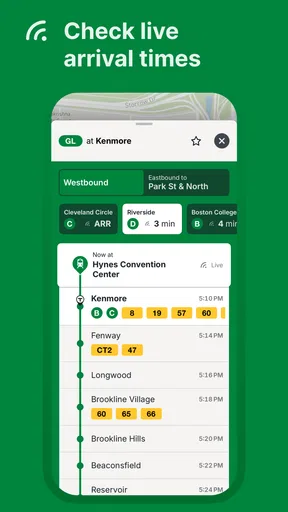
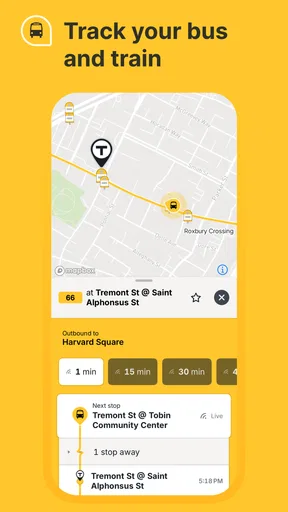
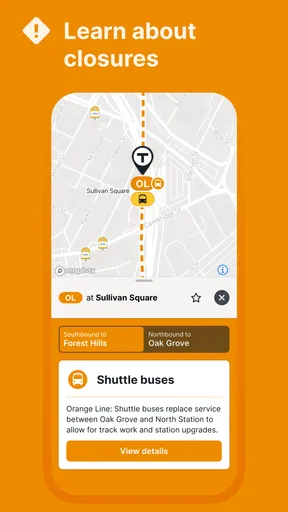
 Analysis by AppCompare
When I need to cross Greater Boston by bus, subway, commuter rail, ferry, or a combination of them, I usually want one thing first: a trustworthy picture of what is happening right now. MBTA Go is built for that specific moment. It is the official public transit app from MBTA, and its focus is live information rather than trying to become a general-purpose travel platform for every kind of trip.
That narrow purpose is its biggest appeal. Instead of treating transit as one layer among many, the app puts the local network at the center. I found it most useful when a normal journey suddenly became uncertain: a vehicle was late, a connection felt tight, or I wanted to know whether checking the next departure on my phone was wiser than walking to the stop immediately.
It is free, rated for Everyone, and belongs in the Maps & Navigation category. The app arrived on February 21, 2025, and version 2.1.4 is the release I reviewed. MBTA is listed as the developer, with more than 50K installs and an average rating of 3.7 from 116 ratings. Those figures suggest a useful but still developing tool rather than a universally polished replacement for every transit app.
How MBTA Go feels when the network is changing
When the network is changing, I use MBTA Go to focus on the next decision rather than trying to predict an entire trip: whether to leave now, wait briefly, or reconsider a connection. I also find it useful to keep a simple fallback in mind before setting out, so a fresh update can guide me without leaving me stuck if the situation shifts again.
Live information matters most at the platform
The difference between a route planner and a live transit companion becomes obvious when I am already outside. Before leaving home, a scheduled journey can look simple. Once I am standing at a stop, however, the practical question changes: is the next vehicle actually approaching, and should I wait for it?
That is where the app makes sense. Its official position gives it a natural role for checking Greater Boston public transit information close to departure time. I would not open it only to admire a route on a quiet afternoon. I would open it because the timetable has become a moving target and I need current information before committing to the next step.
A realistic example is an evening trip from work. I might already know which line normally gets me home, but a delayed departure could make a transfer uncomfortable. Checking the app before leaving the building can change my decision: I may walk to a different stop, wait indoors a little longer, or accept that the original connection is no longer realistic. That small decision is more valuable than a beautifully presented route that assumes everything is running normally.
Worth Reading Before You Choose

EA SPORTS FC Mobile 26 Is a Bigger Football Game, but It Takes Time

Flipboard Shows What News Apps Must Do Beyond the Feed

Switching to Android Auto Means Rethinking Your Driving Routine

Google Calendar Makes a Crowded Week Easier to Manage

Ludo King Makes the Most of the Minutes Between Plans

Baby Panda World Brings Quick Play to Modern Phones, but Its Game Library Feels Busy
Connectivity is part of the experience
Because the app is centered on live transit information, connectivity shapes how useful it feels. At home or in a place with a strong mobile signal, I can check conditions before walking to the stop. In a station, underground passage, crowded event area, or building with weak reception, the experience depends more heavily on whether the phone can reach current information at the moment I need it.
I therefore treat MBTA Go as a connected check-in tool, not as something I would rely on blindly after opening it once. If I am about to begin a complicated journey, I prefer to look at the relevant information while the connection is good and keep a simple mental note of the route and transfer. That habit is not about assuming an offline mode; it is simply sensible preparation for a network-dependent service.
This also affects how I interpret a quiet screen or a slow response. A delay in loading does not automatically mean the transit network is calm, and a lack of immediate information should not be mistaken for confirmation that a vehicle is on time. When the connection is unreliable, I give the app another moment, move to a better signal if possible, and use the information I already gathered rather than repeatedly tapping without a plan.
The best mobile workflow is short and deliberate
On a phone, the app works best when I use it in brief stages. First, I check the journey before leaving. Next, I look again near the stop or station. Finally, I verify the next important departure before making a transfer. This is more practical than keeping the app open continuously, especially when battery, signal, or attention is limited.
That workflow also reduces a common transit mistake: confusing a scheduled time with a dependable arrival. A schedule is useful for planning the shape of a trip, but live information is what helps me decide whether to hurry, wait, or change my immediate action. MBTA Go is strongest in that narrow gap between planning and committing.
For a visitor to Boston, the official focus can be reassuring, particularly when unfamiliar line names or local service patterns make a general map app feel too abstract. For a regular rider, the benefit is less about discovering that transit exists and more about checking the network at the exact point where a delay can cost time.
Where it fits beside ordinary map apps
I would not automatically replace a general map application with MBTA Go. General map apps are often better when I am comparing walking, cycling, driving, and public transit in one view, or when I need door-to-door directions that include a specific address. They can also be convenient when the trip involves several types of transport and I want one broad overview.
MBTA Go has a different advantage: it is a dedicated official window into Greater Boston transit. When the question is specifically about the current state of the MBTA network, a focused app can feel more appropriate than a broad mapping tool that treats public transport as one option among many. I use the general app for the wider journey and MBTA Go for the local transit reality when those two needs are different.
There is a trade-off here. A specialized app can make a focused check easier, but it may not be the only tool I want for a full trip. Someone who rarely rides the MBTA and mainly needs walking directions may find a general map service more convenient. Someone who rides frequently and cares about live conditions has a clearer reason to keep this app available.
Handling weak signal, delays, and uncertainty
The most important recovery skill is to avoid building an entire journey around a single refresh. If the app loads while I have a good connection, I note the next meaningful decision rather than trying to memorize every possible departure. For example, I may remember which line I need, where I must transfer, and whether I have a reasonable alternative if the first option slips away.
When the signal drops at the wrong time, that preparation gives me something to work with. I can continue toward the known station or stop, then check again when reception improves. The app remains useful, but it does not remove the need for ordinary travel judgment. Live information helps me respond to uncertainty; it cannot guarantee that every part of a journey will remain predictable.
I also prefer checking before entering a low-connectivity environment rather than waiting until I am already below ground or moving through a crowded interchange. That is one of the less obvious strengths of a deliberate workflow: the app becomes a planning aid for the next few minutes, not a magical answer that must be available under every condition.
Using the app without wasting mobile data
For most riders, the sensible approach is simple: open MBTA Go when a decision is approaching, read the information that matters, and close it when the decision is made. Repeatedly refreshing while nothing has changed is unlikely to improve the journey, and it can be frustrating when the phone is already struggling with reception.
I would also avoid making live checks the only record of a complicated route. Before setting out, I look at the journey while connected reliably and keep the important sequence in mind. Then I use the app for updates rather than repeatedly reconstructing the whole trip. This makes the experience less dependent on constant loading and keeps my attention on the platform, street, or transfer point.
This matters especially on long days, when I may be moving between weak indoor reception, busy stations, and ordinary mobile coverage. A focused check is more comfortable than treating the phone as a permanent dashboard. It also makes it easier to notice when the app is giving me genuinely new information instead of simply repeating a previous expectation.
Who will get the most from it?
MBTA Go is a good match for Boston-area riders who want a dedicated way to check current public transit information. It is especially sensible for commuters, students, occasional visitors, and anyone whose plans are easily affected by a late bus or a missed connection. The free price removes the main barrier to trying it, and the Everyone age rating makes it broadly approachable.
I also see value for people who already use another map app but want a second, more transit-focused reference. Keeping both does not have to mean choosing one winner. A general map can handle the full route from an address, while MBTA Go can answer the more immediate question of what the MBTA network is doing now.
On the other hand, I would skip it if my travel needs are mostly outside Greater Boston, if I want one app to manage several transport modes equally, or if I rarely need live transit checks. The official focus is a strength only when the MBTA network is central to the trip. For a person looking for broad navigation across many cities, a general platform may be a better everyday default.
What the rating tells me about expectations
The current average of 3.7, based on 116 ratings and 55 reviews, gives me a balanced expectation. I would not install it assuming every interaction will feel perfectly smooth. At the same time, the rating does not erase the app's practical value; transit tools are judged during stressful, time-sensitive moments, and any friction becomes more noticeable when I am already rushing.
The install count of over 50K shows that the app has reached a meaningful audience, while its relatively recent release means I approach it as an app that may continue to mature. Version 2.1.4 is current in my review, so I would keep it updated through the normal app-store process. That is particularly important for a live-information tool, where improvements to reliability and handling of changing service conditions can matter more than decorative extras.
My practical routine for everyday trips
For a normal weekday, I would use the app in this order:
Check the planned service before leaving a reliable connection.
Confirm the next important departure close to the stop or station.
Use the live information to decide whether waiting, walking, or changing the immediate plan makes sense.
Check again before a transfer instead of assuming the first part of the trip guarantees the second.
The key is not to turn every journey into a research project. I use the app to answer the next decision in front of me. That keeps the information useful even when the network changes quickly or the phone connection is inconsistent.
My final view on staying connected
After using MBTA Go as a focused transit companion, I see it as a practical addition rather than a universal navigation replacement. Its strongest quality is the relationship between official local coverage and the immediate needs of a rider already thinking about a departure, delay, or transfer. Its weakest point is the same thing: live information is most valuable when the phone can reach it, so weak connectivity can make the experience less dependable at precisely the wrong moment.
My recommendation is to install it if Greater Boston transit is part of your regular life. Use a general map app when you need broad door-to-door planning, but turn to MBTA Go when the important question is what the MBTA network is doing now. Prepare before entering places where reception may be poor, refresh with a purpose, and keep a basic fallback plan for complicated trips.
That approach matches what this app does best. It does not need to replace every navigation tool to be worthwhile. For the rider who wants a free, official, mobile way to make better decisions around live public transit, MBTA Go is a useful choice, provided you treat connectivity as part of the journey rather than an invisible guarantee.
Pros
- Live subway
- bus
- and commuter rail arrival information
- Official service alerts help track delays and disruptions
- Trip planning covers multiple MBTA transport options
- Station details can make route planning easier
- Useful for navigating Boston without relying on paper schedules
Cons
- Arrival predictions may change during service disruptions
- Some features depend on a stable internet connection
- The interface can feel busy for first-time users
- Coverage is limited to the MBTA service area
- Frequent alerts may require notification settings adjustments
FAQs for MBTA Go — Official
What is MBTA Go — Official?
MBTA Go — Official is a mobile app designed to help passengers navigate the Massachusetts Bay Transportation Authority network in the Boston area. It provides practical information for subway, bus, commuter rail, ferry, and related services, making it easier to check routes, plan trips, review schedules, and stay informed while traveling around Greater Boston.
Can MBTA Go — Official show real-time arrivals and service updates?
Yes, the app is intended to provide current transit information, including estimated arrival times, route details, and service alerts when data is available from the MBTA. The accuracy of predictions can vary because they depend on vehicle tracking, network connectivity, and operational changes. It is still wise to check alerts and station announcements, especially during disruptions or busy travel periods.
Does MBTA Go — Official support trip planning for all MBTA services?
MBTA Go — Official can help users plan journeys across several MBTA transportation options, including subway lines, buses, commuter rail, and ferries. Depending on the trip, the app may combine different services and display transfers or walking directions. Coverage and planning results can change with schedules, temporary closures, and the availability of real-time information.
Do I need an internet connection to use MBTA Go — Official?
An internet or mobile data connection is generally needed to load updated schedules, real-time arrivals, service alerts, maps, and trip-planning results. Some information may remain visible after it has already loaded, but users should not rely on the app as a fully offline navigation tool. Before entering an area with poor reception, it is helpful to review the route and save important details.
Is MBTA Go — Official free to download and does it sell tickets?
The app is generally available as a free download, although normal mobile data charges may apply depending on your carrier and plan. Its main purpose is providing MBTA travel information and planning assistance, so ticket purchasing or fare-payment features may depend on the specific service and current app support. Always confirm fares, payment options, and ticket requirements before starting your trip.


